
Choosing between self vs managed WordPress hosting is one of the most important decisions you’ll make for your website. It determines how secure your site is, how fast it loads, how often it goes down, and how much of your own time you’ll spend fixing technical issues instead of running your business. Most people assume hosting is all the same, but the difference between self-hosting and managed hosting becomes obvious the moment something breaks.
Self-hosting gives you control, but also full responsibility. Managed hosting removes the technical burden but comes at a higher monthly cost. The real question isn’t which option is “best,” but which option protects your business from risk and unnecessary workload. This guide breaks down the true cost, responsibilities, and long-term impact of each hosting model so you can choose confidently.
What “Self-Hosted” Really Means (The Full Responsibility List)
“Self-hosted” sounds simple: install WordPress on a server and you’re done. In reality, self-hosted WordPress means you are responsible for everything that keeps the site secure, online, and performing well. There’s no team monitoring your site, no automatic fixes, and no safety nets unless you build them yourself.
With self-hosting, you must manage:
- All updates (WordPress core, plugins, themes)
- Security hardening and ongoing malware prevention
- Backups and restorations
- Server configuration and optimization
- Uptime monitoring and rapid outage response
- Performance tuning (caching, image optimization, PHP settings)
- Troubleshooting errors and plugin conflicts
- Data loss prevention and recovery plans
If something breaks, whether it’s a plugin update, a database error, or a security breach, you or your developer must handle it. There is no managed support team to fall back on. Our article on WordPress Maintenance and Management helps you better understand the scope of responsibilities.
This model works only for people who have the technical expertise (and time) to maintain a WordPress environment. For everyone else, self-hosting eventually becomes expensive through lost time, emergency developer costs, downtime, and security incidents.
What Managed WordPress Hosting Includes (And Why It Exists)
Managed WordPress hosting was created for one purpose: to remove the technical burden that self-hosted WordPress places on business owners. Instead of handling updates, fixing issues, or responding to security threats yourself, a managed hosting provider does it for you – proactively.
This model is built for businesses that rely on their website for leads, sales, bookings, or reputation. Managed hosting includes the essential tasks required to keep a WordPress site fast, secure, and stable:
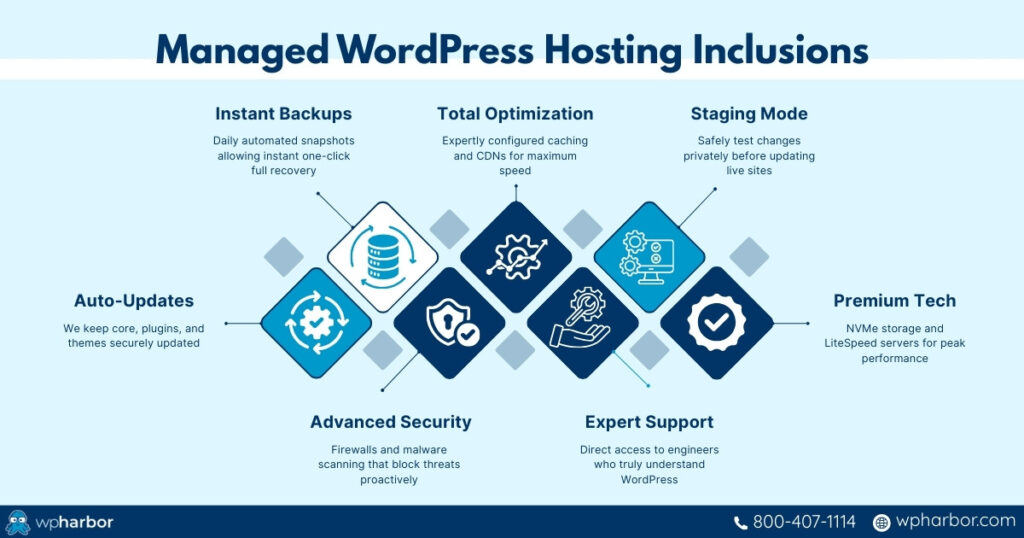
- Automatic updates for WordPress core, plugins, and themes
- Daily (or real-time) backups with one-click restore
- Advanced security layers including firewalls, malware scanning, and brute-force protection
- Performance optimization, caching configuration, CDN integration, and speed tuning
- Expert support from teams who understand WordPress at a technical level
- Staging environments for safely testing design changes and updates
- Server-level optimizations such as NVMe storage, LiteSpeed, and optimized PHP
Simply put, managed hosting shifts the responsibility from the site owner to a team of specialists. You pay more per month, but you eliminate unpredictable repair costs, downtime risks, and the constant “technical upkeep” that drains time and revenue.
For most businesses, managed hosting isn’t a luxury; it’s protection against the kinds of problems that self-hosted setups struggle to prevent.
Cost Comparison: Self-Hosted vs Managed (The Real Numbers)
At first glance, self-hosting looks cheaper. A low-cost server, a few plugins, and you’re online. But the real cost emerges when you factor in everything required to keep a website safe, updated, and functioning reliably.
Here’s how the expenses actually stack up:
A. True Cost of Self-Hosted WordPress
Server Fees
Cheap hosting ≠ reliable hosting. Low-end servers are slower, less secure, and more prone to downtime.
Security Tools
Premium firewalls, malware scanning, login protection, and cleanup tools often cost more than the hosting itself.
Backup Services
Reliable backup solutions with offsite storage frequently require a paid subscription.
Developer Troubleshooting
When something breaks, you pay hourly for a developer to fix plugin conflicts, malware infections, or database errors. Emergency fixes cost even more.
Performance Plugins or Services
Caching, speed optimization, and CDN services add to the bill.
Your Time
This is the hidden cost: every hour spent fixing something is an hour not spent growing your business.
Downtime Losses
If your site goes down during ads, sales, or business hours, revenue and leads vanish instantly.
Self-hosting often starts at $5–$15/mo, but the real cost over time (once you factor in tools, labor, and repairs) is significantly higher.
B. Cost of Managed WordPress Hosting
Managed hosting consolidates everything into a predictable monthly fee that includes:
- Backups
- Security
- Updates
- Performance optimization
- Expert support
- High-speed infrastructure
- Uptime monitoring
There are no surprise fees for malware removal, downtime recovery, or “developer emergencies.” What you pay monthly replaces dozens of separate tools and unpredictable repair costs.
Managed vs. Self-Hosted WordPress Table:
| Cost Area | Self-Hosted WordPress | Managed WordPress Hosting |
| Server Fees | Low upfront cost ($5–$15/mo), but slower performance, weaker security, and higher downtime risk. | Higher monthly fee, but built on high-performance, business-grade infrastructure. |
| Security Tools | Paid plugins for firewalls, malware scanning, login protection, and cleanup, often multiple subscriptions. | Security is built-in: firewalls, malware scanning, threat prevention included. |
| Backup Services | Separate paid backup tools with offsite storage required for reliability. | Automatic backups included, with fast restore options. |
| Updates & Maintenance | Manual updates or risky auto-updates handled by you. | Updates handled professionally with testing and rollback protection. |
| Developer Troubleshooting | Hourly developer fees when plugins conflict, sites crash, or malware appears, especially expensive in emergencies. | Expert support included; issues resolved without surprise invoices. |
| Performance Optimization | Paid caching plugins, CDN services, and speed tools added individually. | Performance optimization, caching, and CDN often included by default. |
| Downtime Costs | Revenue and leads lost during outages, ads, or business hours, costs are unpredictable and immediate. | Uptime monitoring and proactive prevention reduce downtime risk. |
| Your Time | Significant time spent maintaining, fixing, and monitoring the site instead of growing the business. | Minimal time required; technical upkeep is handled for you. |
| Cost Predictability | Unpredictable. Expenses spike during problems, hacks, or growth. | Predictable flat monthly cost with no surprise fees. |
Self-hosted WordPress looks cheaper, but it carries higher financial risk, more hidden expenses, and more workload.Managed hosting is a higher monthly cost, but it provides stability, protection, and professional oversight, which often makes it the most cost-effective choice long-term.
Risk Comparison: What Can Go Wrong With Each Approach
Cost differences matter. However, risk is where the real gap between self vs managed WordPress hosting becomes obvious. When you’re responsible for your own hosting environment, even small mistakes can turn into major business disruptions.
A. Risks of Self-Hosting
Self-hosting gives you control, but it also exposes you to risks that most non-technical owners aren’t prepared for.
Site Crashes During Updates
A single incompatible plugin update can take the entire site offline, and without backups or staging, recovery is difficult and costly.
Security Vulnerabilities
Missed updates, weak servers, or outdated plugins create easy entry points for malware, spam injections, redirects, and data breaches.
Data Loss
If backups aren’t automated or properly stored, a corruption issue or hack can wipe out years of content or transactional history.
Slow Performance Under Load
Low-power servers struggle with traffic spikes, leading to slowdowns and 503 errors, especially during campaigns and peak hours.
No Expert Help
When something breaks, you’re on your own. Emergency developer fixes can cost hundreds of dollars per hour, and there’s no guarantee they’ll be available quickly.
Self-hosting offers flexibility, but that flexibility comes with significant operational risk.
B. Risks of Managed WordPress Hosting
Managed hosting carries fewer risks, but it’s not completely risk-free:
Higher Monthly Cost
You pay more upfront because you’re paying for infrastructure, automation, and expert support.
Less Low-Level Server Control
Developers who want to customize server-side configurations may find managed environments more restrictive.
But for most businesses, these are not meaningful downsides. The trade-off – predictable cost and decreased risk – overwhelmingly benefits non-technical owners and revenue-generating websites.
In practice, the risk profile is clear:
Self-hosting = higher control, higher risk.
Managed hosting = lower control, dramatically lower risk.
Who Should Choose Self-Hosted WordPress? (Honest, Not Idealistic)
Self-hosting isn’t “bad,” it’s just built for a specific type of user. And that user is rare.
Self-hosted WordPress is appropriate for:
Developers and Technical Power Users – If you understand server configurations, caching layers, firewalls, and PHP tuning, self-hosting gives you total control.
Organizations With In-House IT Staff – If your company already has a dedicated technical team capable of maintaining servers, self-hosting can work.
Hobby Sites or Low-Stakes Projects – If downtime, slow performance, or occasional problems don’t affect revenue or reputation, self-hosting may be sufficient.
Custom or Experimental Builds – Some developers prefer self-hosting when they need to customize server-level features not supported by managed hosts.
But for most business owners, especially those driving sales, leads, or bookings, these scenarios don’t apply. They don’t benefit from flexibility as much as they risk losing time, stability, and revenue.
If your website makes money, supports clients, or represents your brand, self-hosting rarely makes business sense.
Who Should Choose Managed WordPress Hosting?
Managed WordPress hosting is built for anyone who wants their website to run smoothly without taking on the workload and risk of maintaining it themselves. For most businesses, it is the safer, more cost-effective, and more predictable option.
Managed hosting is the right choice for:
Businesses That Rely on Their Website for Revenue
If your site generates leads, sales, bookings, or subscriptions, you can’t afford slowdowns, downtime, or security issues. Managed hosting ensures your site stays online and fast, even as you grow.
Non-Technical Founders, Owners, and Marketing Teams
If you don’t have the time or skills to manage updates, security, backups, or performance, a managed host eliminates the technical burden entirely.
Agencies Handling Multiple Client Sites
Agencies benefit from expert-level support, staging environments, backups, and a hosting partner who prevents emergencies instead of reacting to them.
Ecommerce, Membership, or LMS Sites
Dynamic sites require more resources and better security. Managed hosting provides the performance and stability needed to support logged-in users, checkout flows, and real-time transactions.
Companies That Want Predictable Costs
Instead of paying unpredictable emergency developer fees, managed hosting condenses maintenance, security, backups, and support into a single predictable monthly investment.
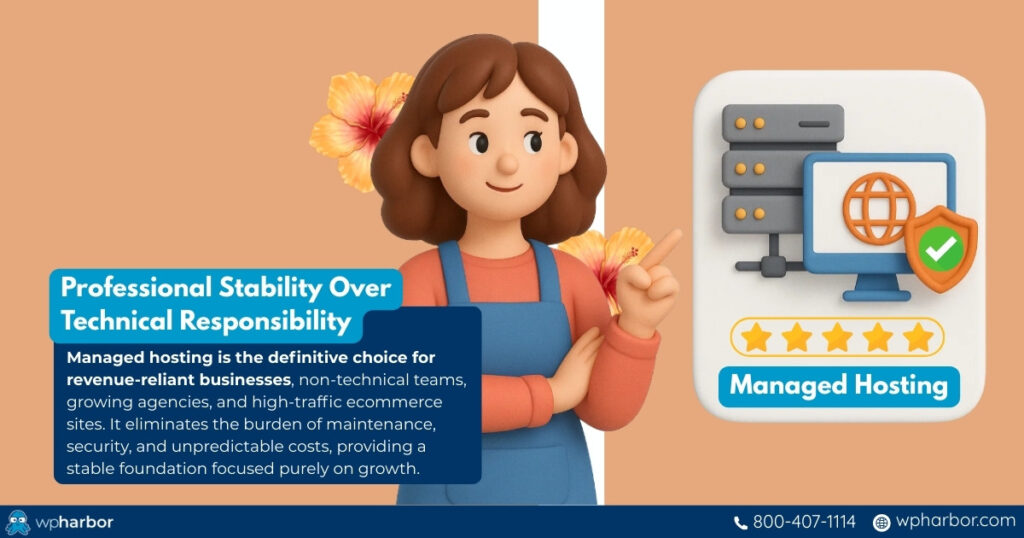
Managed hosting is for anyone who wants professional stability rather than technical responsibility.
Real-World Scenarios That Show the True Difference
Comparing self vs managed WordPress hosting becomes much clearer when you see how each performs under real-world pressure. Here’s a table that business owners encounter every week:
| Scenario | Self-Hosted Outcome | Managed Hosting Outcome |
| 1. Plugin update breaks the site | The site crashes; you spend hours troubleshooting or paying a developer to fix it. | You restore a backup instantly or contact support to resolve it within minutes. |
| 2. Traffic surge from ads or social posts | Cheap servers slow down or throw 503 errors; ad spend is wasted and conversions drop. | Auto-scaling and optimized servers absorb the spike with no downtime. |
| 3. Malware injection or bot attack | You often don’t notice until the site is blacklisted or data is compromised. Cleanup is expensive. | Threats are blocked automatically; continuous malware scanning protects the site proactively. |
| 4. Trying to “save money” with self-hosting | After paying for backups, security tools, CDN, and emergency fixes, total cost exceeds managed hosting, with more stress. | One predictable fee covers security, backups, performance, and expert support. |
| 5. Launching a new feature or redesign | Updates go live without testing, risking broken layouts or site downtime. | Staging environments allow safe previewing and testing before deployment. |
Bottom line: Managed hosting doesn’t just simplify WordPress, it prevents the failures that cost time, money, and credibility.

Choose the WordPress Hosting Model That Protects Your Growth
Both hosting approaches, self-hosted and managed, can run a WordPress site. But they do not offer the same experience, stability, or long-term value.
Self-hosting works only if you (or your team) have the technical skill, time, and appetite for risk. It’s cheaper upfront, but hidden costs accumulate fast: security tools, backups, downtime, emergency fixes, performance plugins, developer hours, and lost conversions. For businesses that depend on their website, this “DIY approach” becomes more expensive and stressful over time.
Managed WordPress hosting removes these risks entirely. You get expert-level performance, security, backups, uptime monitoring, staging environments, and real support, all bundled into one predictable cost. Instead of reacting to problems, you prevent them. Instead of maintaining your website, you grow your business.
If your website plays any meaningful role in revenue, customer trust, brand reputation, or daily operations, managed hosting isn’t a luxury – it’s infrastructure.
Choose the hosting model that supports your goals, not one that slows you down. If you’re ready for a safer, faster, truly hands-off WordPress experience, explore WP Harbor’s fully managed hosting built for performance, security, and growth.