
Most WordPress security problems don’t start with a dramatic hack or a targeted attack. They start quietly; with an outdated plugin, a missed update, a weak login, or a vulnerability that was patched weeks ago but never applied. From there, the damage compounds quickly.
For businesses, security failures are rarely just “website problems.” They interrupt operations, expose customer data, harm SEO rankings, and damage trust. A hacked site can be flagged by Google, taken offline by a host, or blacklisted by browsers; all before the business owner even realizes something is wrong.
The challenge is that WordPress is an ecosystem, not a single piece of software. Your site relies on WordPress core, themes, plugins, server configuration, user permissions, file access rules, and ongoing monitoring. Security is only as strong as the weakest link, and most vulnerabilities don’t come from WordPress itself; they come from neglected updates, poor configurations, or unmonitored changes.
This is why managed WordPress security exists. It’s not about reacting after something breaks. It’s about preventing problems before they turn into downtime, cleanup costs, or reputational damage.
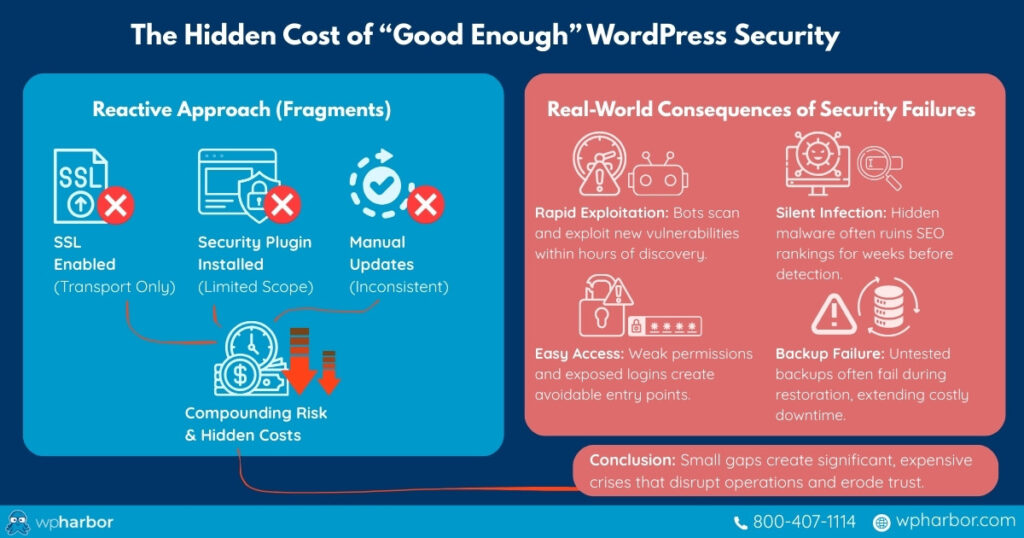
The Hidden Cost of “Good Enough” WordPress Security
Many site owners assume that installing a security plugin or enabling SSL is enough. In reality, those are only fragments of a complete security strategy. Without continuous monitoring, disciplined WP updates, hardened server rules, and recovery planning, security becomes reactive instead of preventative.
The most common security failures happen because:
- Vulnerabilities are known but not patched
- Malware goes undetected for weeks
- File permissions are misconfigured
- Login endpoints are left exposed
- Backups exist but can’t be restored quickly
Each of these issues is manageable on its own. Together, they create risk that compounds silently, until something breaks at the worst possible time.
What’s Included in Managed WordPress Security (Harbor Care)
A Managed WordPress Security approach isn’t one feature or one plugin. It’s a layered system that protects your site at multiple levels simultaneously. Below is how that protection is structured, based strictly on what’s included in Harbor Care.
Ongoing WordPress, Theme, and Plugin Updates
Security starts with updates. Harbor Care checks and applies WordPress core, theme, and plugin updates on a scheduled basis, reducing exposure to known vulnerabilities. Since attackers actively scan for outdated software, keeping everything current is one of the most effective ways to prevent compromise in the first place
Continuous Security Monitoring and Malware Scanning
Websites are actively monitored to detect suspicious activity and code changes. This includes real-time monitoring and daily deep malware scans performed off-server to avoid performance impact. If malicious behavior appears, it’s identified early, before it spreads or causes damage
Web Application Firewall and Bot Protection
Harbor Care includes a web application firewall, brute-force login protection, and intelligent bot filtering. These measures block common attack vectors such as credential stuffing, automated exploits, and unauthorized access attempts before they ever reach WordPress itself
Hardened WordPress Configuration
Security isn’t just about blocking attacks; it’s also about reducing what can be attacked. Harbor Care applies one-time and ongoing hardening measures, such as restricting file permissions, blocking access to sensitive files, disabling unnecessary features like XML-RPC and file editing, and preventing PHP execution in unsafe directories. These controls significantly reduce the surface area attackers can exploit
Dual Backup System With Redundancy
Backups are not treated as an afterthought. Harbor Care maintains multiple backup layers (nightly, weekly, and bi-weekly) stored across separate cloud environments. This ensures that if anything goes wrong, your site can be restored quickly and reliably, without scrambling or rebuilding from scratch
Free Malware Removal When It Matters Most
If a site is compromised while under management, malware is removed by WordPress experts at no additional cost. The focus is on restoring security and stability quickly, without adding financial stress during an already disruptive event
Active Uptime and Status Monitoring
Most hosts only care if the server is running; not whether your site actually works. Harbor Care actively monitors site availability and responds when a site becomes unreachable, often resolving issues before the business owner even notices
| Security Layer | What It Does | Why It Matters for Your Business |
| Ongoing WordPress, Theme & Plugin Updates | Core, theme, and plugin updates are reviewed and applied on a scheduled basis to keep software current and secure. | Outdated software is the #1 entry point for attacks. Staying updated drastically reduces your exposure to known vulnerabilities. |
| Continuous Security Monitoring & Malware Scanning | Real-time monitoring combined with daily, off-server malware scans to detect suspicious activity or file changes early. | Threats are caught before they spread, break functionality, or damage your reputation; without slowing down your site. |
| Web Application Firewall & Bot Protection | Filters malicious traffic, blocks brute-force login attempts, and stops automated exploits before they reach WordPress. | Prevents common attacks like credential stuffing and bot abuse that can cripple sites or compromise accounts. |
| Hardened WordPress Configuration | Applies security hardening such as restricted file permissions, disabled XML-RPC, blocked file editing, and limited PHP execution. | Reduces the attack surface so there’s simply less for hackers to exploit, even if they try. |
| Dual Backup System with Redundancy | Maintains multiple backup layers (nightly, weekly, bi-weekly) stored across separate cloud environments. | Ensures fast, reliable recovery without panic, guesswork, or rebuilding your site from scratch. |
| Free Malware Removal (If Compromised) | If a site is infected while under management, malware is removed by WordPress experts at no extra cost. | Eliminates surprise cleanup fees during an already stressful situation and restores stability quickly. |
| Active Uptime & Status Monitoring | Monitors site availability and responds when your site becomes unreachable, not just when a server is online. | Issues are often resolved before you even notice, protecting revenue, leads, and credibility. |
Why This Matters for Business Owners
From a business perspective, managed WordPress security isn’t about technical checklists; it’s about eliminating avoidable disruption. Poor security tends to drain time and money in quiet but expensive ways, often without warning.
Managed WordPress security reduces three major risks that consistently impact business operations:
Unplanned downtime
Outages caused by hacks, malware, or compromised files can take a site offline instantly. For businesses that rely on their website for leads, sales, bookings, or credibility, even short downtime translates into lost revenue and missed opportunities.
Emergency expenses
Security issues are almost never budgeted. Cleanup fees, developer hours, rushed fixes, and recovery work often cost far more than ongoing prevention. What looks like a “one-time issue” quickly becomes an expensive interruption.
Mental overhead
Constant update notifications, security alerts, vulnerability warnings, and “is my site okay?” concerns create ongoing stress. Business owners shouldn’t have to worry about whether a plugin update could break their site or if a vulnerability has gone unnoticed.
By handling security proactively, managed WordPress security turns a constant background risk into a predictable, controlled system. Your site stays protected, monitored, and recoverable, without requiring you to understand server configurations, malware signatures, or security tooling.
How This Compares to DIY or Freelance Security
Many businesses try to manage WordPress security themselves or bring in outside help only after something goes wrong. On the surface, this can appear more affordable. In reality, it’s usually reactive, inconsistent, and more expensive over time.
Hiring freelance security support often involves costs like:
- $75–$150 per hour just to investigate issues
- $300–$1,000+ for malware cleanup
- Ongoing monthly retainers for monitoring, with limited guarantees
And that assumes the problem is detected early, before search rankings drop, customers are affected, or data is exposed.
DIY approaches typically rely on stacking plugins, manually approving updates, and hoping nothing conflicts. Security becomes fragmented: one tool for firewalls, another for backups, another for scans, and no clear process tying it all together. This creates gaps, and attackers look for gaps.
Managed WordPress security replaces that uncertainty with coverage. Instead of reacting to problems after damage occurs, businesses pay a predictable monthly fee that includes prevention, monitoring, recovery, and expert intervention – built into one cohesive system. It’s not just cheaper in the long run; it’s calmer, safer, and far more reliable.

Security That Works Quietly in the Background
The best security isn’t noticeable. It doesn’t interrupt your work, slow your site, or demand constant attention. It simply works; protecting your website while you focus on running your business.
Managed WordPress security isn’t about fear. It’s about confidence. Confidence that updates are handled, threats are monitored, backups are ready, and help is available when it’s needed most.
If your website matters to your business, security shouldn’t be optional or reactive.
Protect your site before problems appear.
Explore WP Harbor’s Managed WordPress Security and keep your website secure, stable, and online; without the stress.