
If your WordPress site loads slowly, your visitors won’t wait around, and neither will Google. In today’s web, speed is everything. It determines how users perceive your brand, how well your site converts, and how high you rank on search results. Learning how to speed up your WordPress site isn’t just about getting better scores. It’s about delivering a faster, smoother, and more trustworthy experience that makes users stay longer and buy more.
Here’s what Google thinks: its Core Web Vitals are now part of the ranking algorithm, rewarding websites that perform well on loading speed, interactivity, and visual stability. The higher you score, the better your visibility, engagement, and sales!
This guide breaks down exactly what affects your Core Web Vitals, and shows how to reach a 90+ performance score with proven steps and the right hosting foundation.

What Core Web Vitals Mean for WordPress Speed
If you’re serious about learning how to speed up your WordPress site, you’ll quickly come across three words that matter most: Core Web Vitals. These aren’t random scores; they’re Google’s way of judging whether your site delivers a fast, stable, and enjoyable experience.
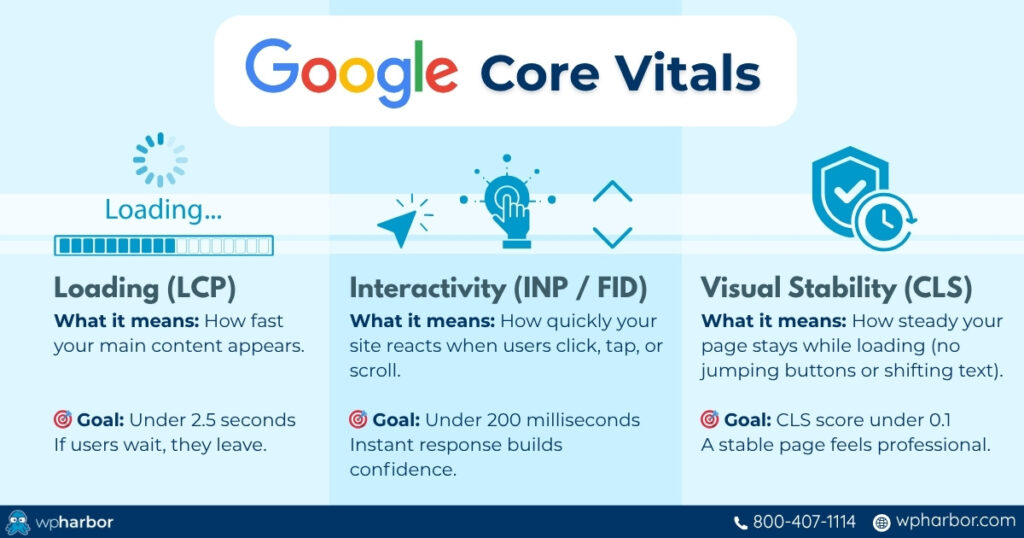
Think of Core Web Vitals as a performance report for your website’s real-world usability. They measure how long it takes your most important content to appear, how quickly your site reacts when users click something, and whether the layout stays steady while loading.
Here’s how each factor influences your WordPress speed:
- Loading Performance (LCP): This is when your main content finally appears on screen. If your hero image or key section takes too long to show, users assume the whole site is slow, and often leave.
- Interactivity (INP): This gauges how responsive your site feels when someone taps a button or opens a menu. A laggy click, even by half a second, makes your site feel broken.
- Visual Stability (CLS): Ever tried clicking a link only for the page to jump and you hit an ad instead? That’s poor stability. CLS ensures your layout doesn’t shift unexpectedly as elements load.
A high Core Web Vitals score signals to Google that your site isn’t just fast; it’s delightful to use. And when that happens, your rankings, conversions, and overall credibility rise together.
Improving these metrics is the foundation of how to speed up your WordPress site, and you’ll see exactly how to do that in the next section. If you’re interested in learning why it matters from a business perspective, read our Why a Fast Website Is Your Best Salesperson article.
How to Speed Up Your WordPress Site Step-by-Step
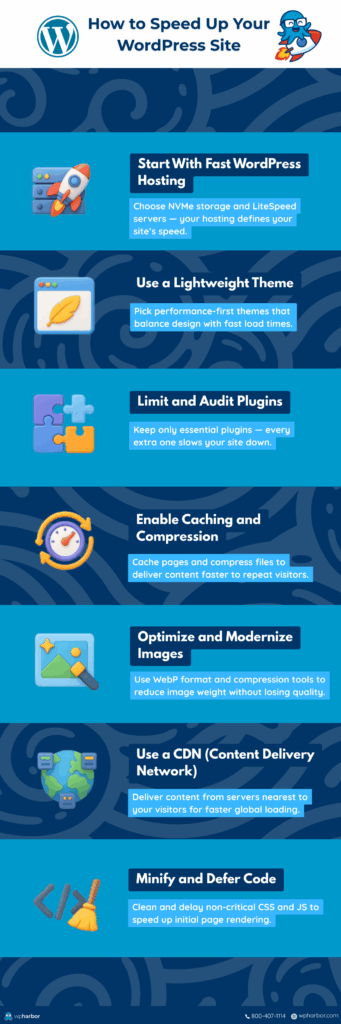
Now that you understand what affects your Core Web Vitals, it’s time to take action. Here’s a step-by-step approach on how to speed up your WordPress site, not just for better scores, but for a faster, smoother user experience.
Step 1: Start With Fast WordPress Hosting
Your hosting is the foundation of performance. Even the best optimization won’t matter if your server is slow.
Look for providers that use NVMe storage, LiteSpeed servers, and built-in caching. These technologies deliver faster data access and handle spikes in traffic effortlessly.
If your goal is a consistent 90+ Core Web Vitals score, start by upgrading your hosting; everything else builds on this. To learn how to identify a great WP host, use our WordPress Checklist.
Step 2: Choose a Lightweight Theme
Heavy themes packed with animations and unnecessary features can slow your site dramatically. Go for performance-first themes, which are optimized for speed and Core Web Vitals compliance.
Keep in mind that performance-first themes do not mean compromising web design. It just means that functionality and performance are the priority.
Step 3: Limit and Audit Your Plugins
Every plugin adds code and potential delay.
Keep only essential ones and remove outdated or duplicate tools. All the premium plugins that we include in our Managed WordPress Hosting service are fast, effective, and do not hinder your from getting that 90+ score on Core Web Vitals.
Step 4: Enable Caching and Compression
Caching stores versions of your pages so they load instantly for repeat visitors.
Use a plugin like LiteSpeed Cache, WP Rocket, or W3 Total Cache to handle both server and browser caching.
Step 5: Optimize and Modernize Your Images
Images often cause slow LCP scores.
Convert them to modern formats like WebP, compress them using graphic editing tools, and use responsive sizes so mobile users don’t load massive files unnecessarily.
Step 6: Use a CDN (Content Delivery Network)
A CDN distributes your content to global servers so users load your site from the nearest location.
This dramatically cuts load time for international visitors and improves Core Web Vitals across regions.
At WP Harbor, we use Cloudflare CDN to ensure your content loads quickly from all around the globe!
Step 7: Minify and Defer Unused Code
Clean up your CSS, JavaScript, and HTML to remove excess weight.
Defer loading non-critical scripts so they don’t block your page’s initial render.
Implementing these steps will help you speed up your WordPress site significantly, and every improvement pushes your Core Web Vitals closer to that 90+ goal.
Test Your WordPress Speed and Track Improvements
Once you’ve optimized your site, it’s time to measure the results. Testing regularly helps you understand how each change affects your Core Web Vitals, and ensures your site stays fast as you grow.
Start with this free tool:
- Google PageSpeed Insights – The official Core Web Vitals test, showing mobile and desktop scores with clear improvement tips.
When analyzing results, focus on trends rather than chasing a perfect score.
For example, improving your LCP from 4 seconds to 2.3 is a huge win, even if you’re not at 100. Keep track of changes in a spreadsheet or analytics dashboard. Over time, you’ll see how small optimizations compound into a major performance boost.
If you ever see scores dropping again, check your hosting first; it’s often the silent factor behind slower results. Upgrading to fast WordPress hosting ensures your gains stay consistent, no matter how much your traffic grows.
Why Fast WordPress Hosting Is the Key to 90+ Scores
You can optimize every plugin, compress every image, and minify every script; but if your server is slow, your site will never reach its potential. That’s why fast WordPress hosting is the true foundation of performance.
Speed starts before a visitor ever loads your page. Every request, every image, and every script is handled by your hosting environment, and that’s where milliseconds are won or lost.
Modern hosting built for performance uses advanced technology like:
- NVMe storage – for faster data retrieval and lower latency.
- LiteSpeed web servers – optimized for high concurrency and smart caching.
- Server-level caching and HTTP/3 support – for quicker, more secure connections.
These upgrades don’t just make your site faster; they stabilize it. A sudden surge in traffic won’t bring it down. Your Core Web Vitals stay consistent, and your visitors always experience the same smooth speed.
So if you’re wondering how to speed up your WordPress site without constant maintenance or plugin overload, start here. The right hosting platform does the heavy lifting automatically, and it’s the easiest way to lock in a 90+ Core Web Vitals score for the long haul.
Common WordPress Speed Mistakes to Avoid
Even if you’ve optimized everything correctly, small missteps can undermine your progress. Below are the most common issues that prevent site owners from achieving faster load times and how to fix them.
| Mistake | Why It Slows Down Your Site | How to Fix It |
| Using cheap or overcrowded hosting | Shared servers often host hundreds of sites, causing slow response times and inconsistent uptime. | Upgrade to fast WordPress hosting with NVMe storage and LiteSpeed servers for consistent performance. |
| Installing too many plugins | Every plugin adds code, queries, and potential conflicts that increase page load times. | Keep only essential plugins and perform regular plugin audits. |
| Uploading unoptimized media | Large images and videos increase page weight and hurt LCP scores. | Compress and resize media before uploading; use WebP format for better efficiency. |
| Ignoring mobile performance | Mobile visitors expect fast, responsive sites; many pages fail on mobile despite good desktop scores. | Test mobile speed using PageSpeed Insights and optimize layout and assets for smaller screens. |
| Skipping caching and CDN setup | Without caching, each page reloads all assets from the server, wasting bandwidth and time. | Enable caching plugins and use a global CDN to deliver content faster worldwide. |
| Neglecting regular speed tests | Each update or new feature can introduce performance issues unnoticed over time. | Re-test Core Web Vitals quarterly using PageSpeed Insights, GTmetrix, or WebPageTest. |
Avoiding these pitfalls is crucial when learning how to speed up your WordPress site. With the right hosting, ongoing testing, and disciplined optimization habits, your site can maintain consistent 90+ Core Web Vitals scores year-round.

Make Your WordPress Site Fast and Future-Proof
Speed isn’t just about scoring higher on tests; it’s about building trust, improving conversions, and staying competitive in search results. When you understand how to speed up your WordPress site, you’re investing in long-term growth.
Every second counts. From hosting and caching to image optimization and clean code, each improvement compounds into a faster, smoother experience for your users. And in a digital world where attention spans are shrinking, that speed becomes your advantage.
But remember: the foundation of lasting performance starts with your hosting. Fast WordPress hosting eliminates server bottlenecks, keeps Core Web Vitals stable, and ensures your optimizations actually deliver results.
Your visitors expect instant access. Your business deserves it too.
Make the switch to fast WordPress hosting that helps you score 90+ on Core Web Vitals, and stay there. Explore WP Harbor Managed Hosting that ensures lightning fast performance, unbeatable security, and an expert team you can trust!