
Upgrading to a high-speed host is one of the best decisions you can make for your website. NVMe storage, LiteSpeed servers, and global CDNs deliver instant improvements in page load times and overall reliability. But here’s the truth: even the fastest hosting can only take you so far. Your site’s performance still depends on how well it’s optimized. Without proper WordPress speed optimization, you won’t unlock the full potential of your hosting environment.
Speed isn’t just about hardware; it’s about how your WordPress setup uses that hardware. Unoptimized code, bloated themes, and heavy plugins can all slow down a site, no matter how advanced the hosting infrastructure is.
The good news? With the right optimization practices, or professional WordPress speed optimization services, you can fine-tune your site to load in milliseconds, maintain stable Core Web Vitals, and provide a smoother experience across all devices.
The Foundation: What a High-Speed Host Provides
Before you can optimize effectively, it’s important to understand what your high-speed host is already doing behind the scenes. A quality hosting provider gives you the technical foundation that makes performance optimization easier and more effective.
Here’s what a true high-speed host provides:
- NVMe Storage: Next-generation solid-state drives that offer lightning-fast data access, significantly reducing load times for dynamic WordPress content.
- LiteSpeed Web Servers: A high-efficiency server technology that handles simultaneous visitors better than traditional Apache or Nginx setups.
- Built-In Caching Layers: Server-side caching that reduces redundant processing, delivering content faster on repeat visits.
- Integrated CDN: Content Delivery Networks ensure global users access your site from the nearest server for consistent load speed.
- Optimized PHP and MySQL Configurations: Backend environments fine-tuned for WordPress efficiency and stability.
This infrastructure eliminates many of the technical barriers that typically slow websites down. However, to fully leverage it, you still need targeted WordPress speed optimization: the on-site and code-level adjustments that make the most of your hosting environment.
If you want to learn more about what a high-speed host is all about, read our Premium WordPress Hosting Explained guide.
WordPress Speed Optimization Essentials
Even on a high-speed WordPress host, your website’s configuration can make or break performance. Proper WordPress speed optimization ensures your site runs as efficiently as the server allows.
Here’s how to fine-tune your WordPress setup for maximum speed:
Lightweight Design and Theme Choice
Start with a theme built for performance. Avoid multipurpose designs overloaded with scripts and animations. Choose lightweight themes like Divi, which balance clean design with fast loading times.
Plugin Management
Every plugin adds code, and every line of code adds load time. Keep only the plugins you truly need, update them regularly, and remove duplicates. Regular plugin audits are an essential part of WordPress speed optimization services.
Image and Media Optimization
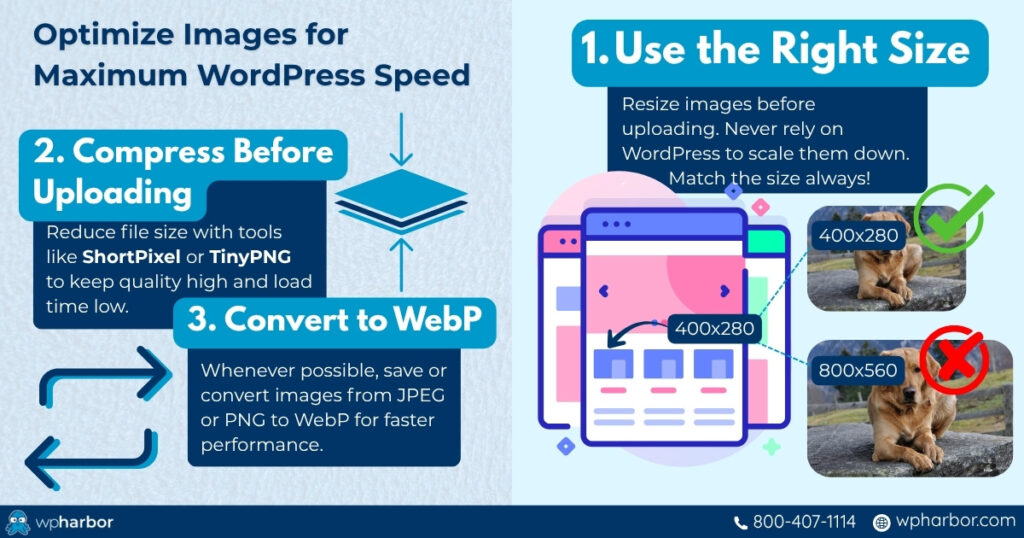
Images are one of the biggest performance killers. Compress them without losing quality, use next-gen formats like WebP, and scale them responsively for mobile devices. Tools like ShortPixel and Imagify can automate this process.
Caching and Minification
Caching is one of the most effective ways to improve site speed. Use server-side caching from your host along with browser caching and CSS/JS minification. This reduces load times by serving ready-to-go pages instead of rebuilding them every visit.
Database Optimization
Clean up post revisions, transients, and unused tables that accumulate over time. A lean database improves query speed and keeps the backend responsive.
CDN and DNS Optimization
A CDN (Content Delivery Network) ensures that visitors from any location load your site quickly. Combine this with a fast DNS provider to minimize lookup time and latency. These steps turn your fast hosting into a fully optimized engine, maximizing every advantage your infrastructure provides.
Professional WordPress Speed Optimization Services
Sometimes, even with best practices, your site still needs expert intervention. That’s where professional WordPress speed optimization services come in.
Specialists don’t just apply generic fixes; they analyze your entire system to identify hidden bottlenecks that automated tools can’t see. This includes:
- Server-Level Optimization: Fine-tuning PHP workers, object caching, and OPcache for optimal backend efficiency.
- Core Web Vitals Improvement: Addressing LCP, INP, and CLS issues that affect both user experience and SEO rankings.
- Code and Asset Refinement: Combining, deferring, and lazy-loading scripts and fonts for smoother visual loading.
- Custom CDN and Cache Configuration: Adjusting cache rules and regional delivery for global consistency.
- Database Profiling: Identifying slow queries and restructuring indexes for long-term performance.
At WP Harbor, our managed WP hosting includes a couple of these WordPress speed optimization services by default, ensuring every client benefits from both powerful infrastructure and expert configuration. Professional optimization bridges the gap between fast hosting and peak site performance, giving you measurable results that last.
Measuring Results and Maintaining Speed
Once your optimizations are in place, the next step is tracking results. Measuring performance helps confirm that your changes are working and identifies new opportunities for improvement.
Start with these reliable tools:
- Google PageSpeed Insights: Measures Core Web Vitals and provides actionable recommendations.
- GTmetrix: Offers waterfall charts to pinpoint slow-loading assets.
- WebPageTest: Tests real-world load times from multiple geographic regions.
When analyzing your reports, focus on consistency. Small fluctuations are normal, but significant drops usually signal a change in plugins, themes, or server configuration.
To maintain speed long-term:
- Review plugins quarterly and remove unnecessary ones.
- Recompress and update images as your media library grows – it’s absolutely common to miss optimizing a few images.
- Test after every major theme or plugin update.
- Clear CDN and caching layers periodically to prevent outdated assets.
Combining regular maintenance with a high-speed host ensures your WordPress speed optimization efforts continue paying off, keeping your site stable, fast, and search-engine friendly over time.
Why Hosting + Optimization = Long-Term Speed
Fast hosting provides the foundation, but optimization keeps it performing at its peak.
Even with NVMe storage and LiteSpeed servers, your site still needs regular tuning to stay efficient and secure. That’s the balance between infrastructure and configuration: hosting gives you the raw power, while WordPress speed optimization ensures that power is used intelligently. When these two elements work together, you get:
- Consistent Core Web Vitals scores above 90
- Faster response times during traffic surges
- Improved SEO rankings and ad performance
- Lower bounce rates and higher conversion rates
Many site owners invest in hosting upgrades but skip ongoing optimization, which means they’re only getting part of the benefit. To sustain top-tier performance, both must evolve together. At WP Harbor, our WordPress speed optimization services are designed to complement our high-speed hosting, giving you a complete, long-term solution for reliability, speed, and scalability.

Get the Best of Both Worlds
Speed optimization and hosting are two sides of the same coin. A high-speed host gives your website the capability to perform; optimization ensures that every aspect of your WordPress setup takes advantage of that capability.
With the right strategy, your site can achieve lightning-fast load times, exceptional Core Web Vitals scores, and a flawless experience across all devices. If you’re ready to experience the full potential of your hosting, it’s time to combine infrastructure with expert optimization.
Get both: world-class hosting and professional WordPress speed optimization services, in one managed solution. Try WP Harbor Managed Hosting today for FREE and feel the difference!